CyberDefenders - QBot Lab
Reconstruct the QBot malware infection timeline by analyzing memory dumps, identifying malicious processes, files, and network communications using Volatility3 and VirusTotal.
Intro Text
A company's security team detected unusual network activity linked to a potential malware infection. As a forensic analyst, your mission is to investigate a memory dump, identify the malicious process, extract artifacts, and uncover Command and Control (C2) communications. Using Volatility3, analyze the attack, trace its origin, and provide actionable intelligence.
A link to the lab can be found here: https://cyberdefenders.org/blueteam-ctf-challenges/QBot/
To answer these questions, we'll need to use Volatility 3, which is a great tool that no matter how many times I've used it, I seem to forget all the options to whenever I use it 😅. So I'll be using this cheat sheet as reference while competing this task.
Questions
-
Our first step is identifying the initial point of contact the malware made with an external server. Can you specify the first IP address the malware attempted to communicate with?
We can use the
windows.netscanplugin on the memory dump to retrieve all the connections present in the dump.ubuntu@ip-172-31-38-130:~/Desktop/Start here/Artifacts$ vol.py -f memory.dmp windows.netscan Volatility 3 Framework 2.5.0 Progress: 0.00 Scanning WindowsCrashDump64Layer using PageMapScProgress: 0.00 Scanning WindowsCrashDump64Layer using PageMapScProgress: 23.33 Scanning WindowsCrashDump64Layer using PageMapScProgress: 0.00 Scanning WindowsCrashDump64Layer using PageMapScProgress: 100.00 Stacking attempts finished Progress: 0.00 Scanning memory_layer using BytesScanner Progress: 0.32 Scanning memory_layer using BytesScanner Progress: 0.63 Scanning memory_layer using BytesScanner Progress: 0.00 Scanning layer_name using PdbSignatureScanner Progress: 0.00 Scanning layer_name using PdbSignatureScanner Progress: 100.00 PDB scanning finished Offset Proto LocalAddr LocalPort ForeignAddr ForeignPort State PID Owner Created 0x950000047010 TCPv4 192.168.58.135 50120 13.107.22.239 443 ESTABLISHED - - N/A 0x95000005d2c0 TCPv4 0.0.0.0 5040 0.0.0.0 0 LISTENING 3788 svchost.exe 2023-10-12 11:35:52.000000 0x95000005ed80 TCPv4 192.168.58.135 139 0.0.0.0 0 LISTENING 4System 2023-10-12 11:35:57.000000 0x9500001637b0 UDPv4 0.0.0.0 16528 * 0 3700 svchost.exe 2023-10-12 11:35:57.000000 0x9500001637b0 UDPv6 :: 16528 * 0 3700 svchost.exe 2023-10-12 11:35:57.000000 0x950000163bd0 UDPv4 0.0.0.0 0 * 0 1480 svchost.exe 2023-10-12 11:35:57.000000 0x950000163bd0 UDPv6 :: 0 * 0 1480 svchost.exe 2023-10-12 11:35:57.000000 0x9500001f8010 TCPv4 192.168.58.135 49781 20.199.120.182 443 ESTABLISHED - - N/A 0x9500001f8420 TCPv4 192.168.58.135 50460 94.140.112.73 80 CLOSED -- N/A 0xcd8eeda705e0 TCPv4 192.168.58.135 50457 52.111.236.23 443 ESTABLISHED - - N/A 0xcd8eeda931b0 UDPv4 0.0.0.0 16608 * 0 3700 svchost.exe 2023-10-12 11:35:57.000000We can see some external Ip addresses here, but loading them into something like VirusTotal, we can see that the first two on the list are Microsoft owned IPs, that should be safe. The third one though, although it is now marked as safe in VirusTotal, inspecting the Relations tab, we can see that it has been used to host all kinds of malware. So the answer is
94.140.112.73.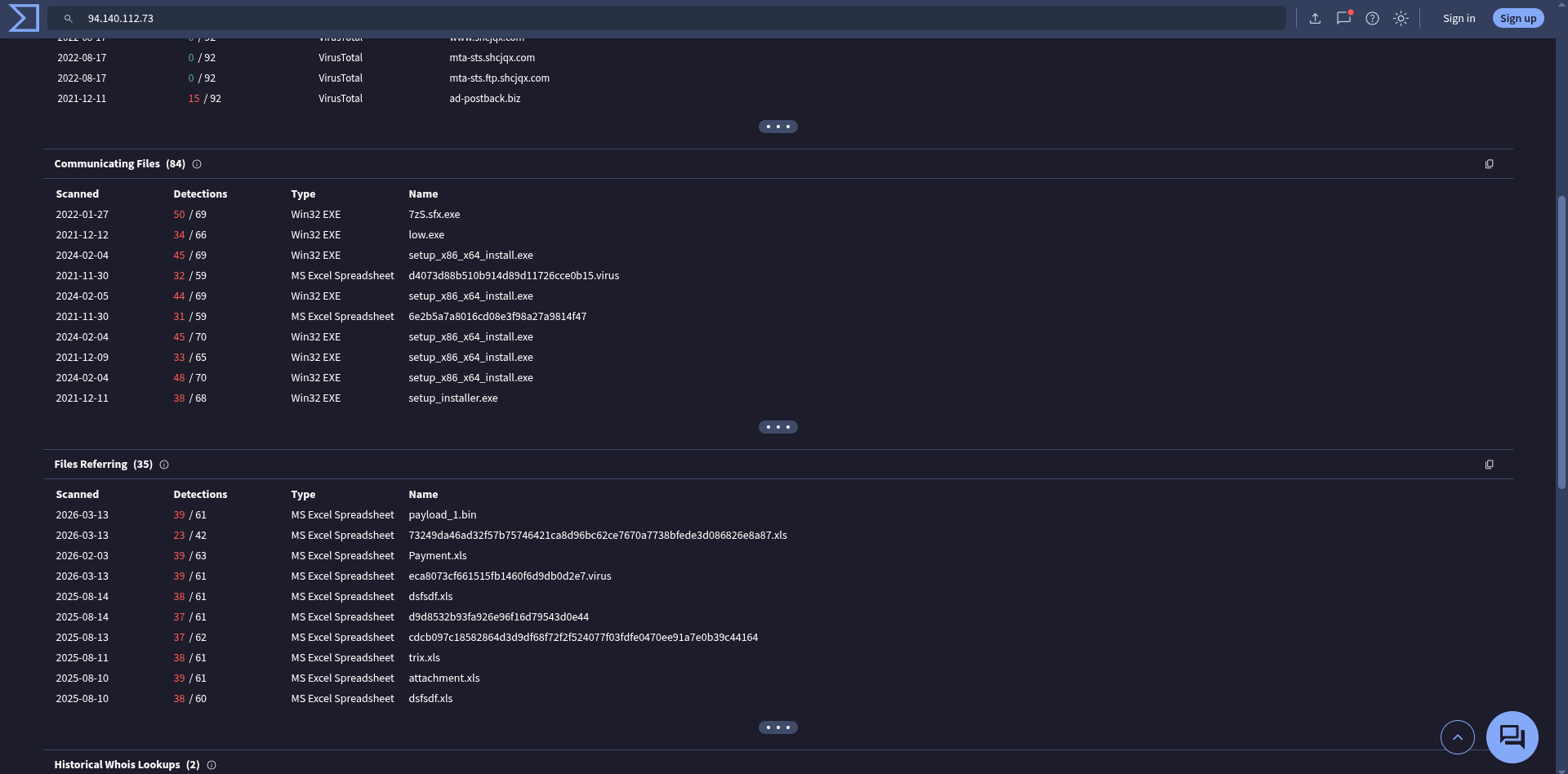
-
We need to determine if the malware attempted to communicate with another IP. Which IP address did the malware attempt to communicate with again?
There are various IP addresses in the output of
windows.netscanthat have been marked as malicious in the past (multiple of them even match the format specified for this question 😅), but through trial and error I found that the last connection in the output contained the desired IP address. And then plugging45.147.230.104into VirusTotal we can see that it has also been used to host malicious files.
After answering the question, I looked into the solutions to see how I was supposed to know which IP I was supposed to choose. They analyze the whole dump in a deeper fashion during the data gathering in the first question, and therefore it's obvious which IP address should be the answer of this question. While I feel that the way their analysis was done was the most "correct" way of doing it, I also feel that the order of the questions should "train" us into doing it the "correct" way, but I feel that in the case of this lab, it's a bit disjointed. I feel that the questions should guide the exploration, like the lab name implies (at least to me).
-
Identifying the process responsible for this suspicious behavior helps reconstruct the sequence of events leading to the execution of the malware and its source. What is the name of the process that initiated the malware?
Using
windows.pstree, we can see the process tree of all programs running in the system when the dump was captured. Inside the user session (at least I think that's what it means when the processes are indented underwinlogon.exe), we can findexcel.exerunning, which can be a common vector for malware infection.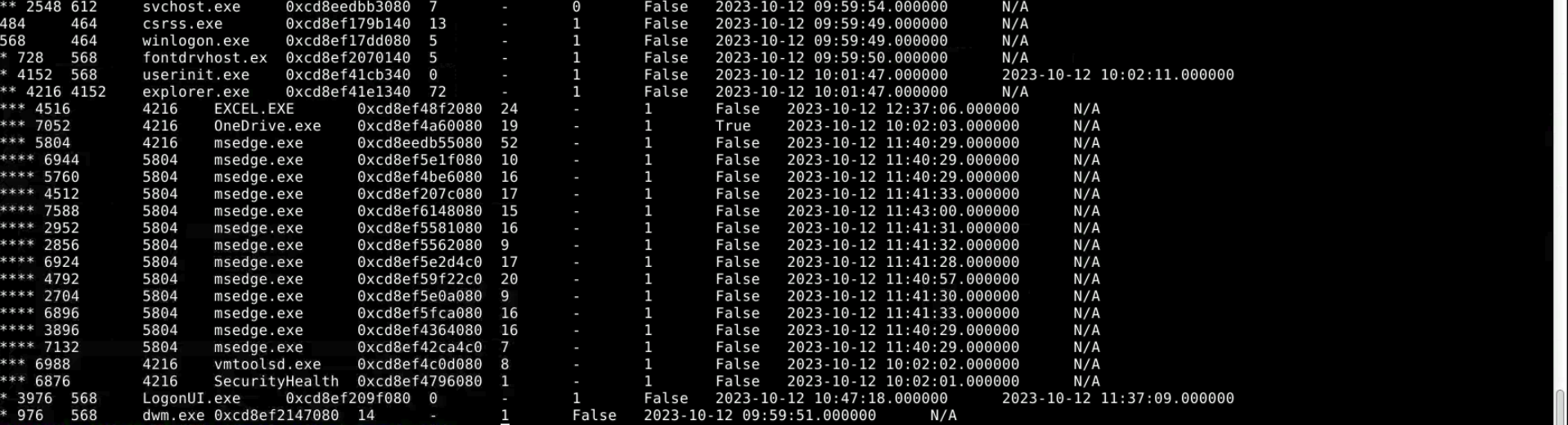
-
The malware's file name is crucial for further forensic analysis and extracting the malware. Can you provide its file name?
To find this out, we need to dump all files associated with the excel process running, to do that we can use the
windows.dumpfileplugin in volatility, taking care to pass the process ID instead of the parent's process ID (the process ID is the one that is the most ot the left on the above screenshot). This command will take a long time to run though, so you can go and take a little break after starting it 😛.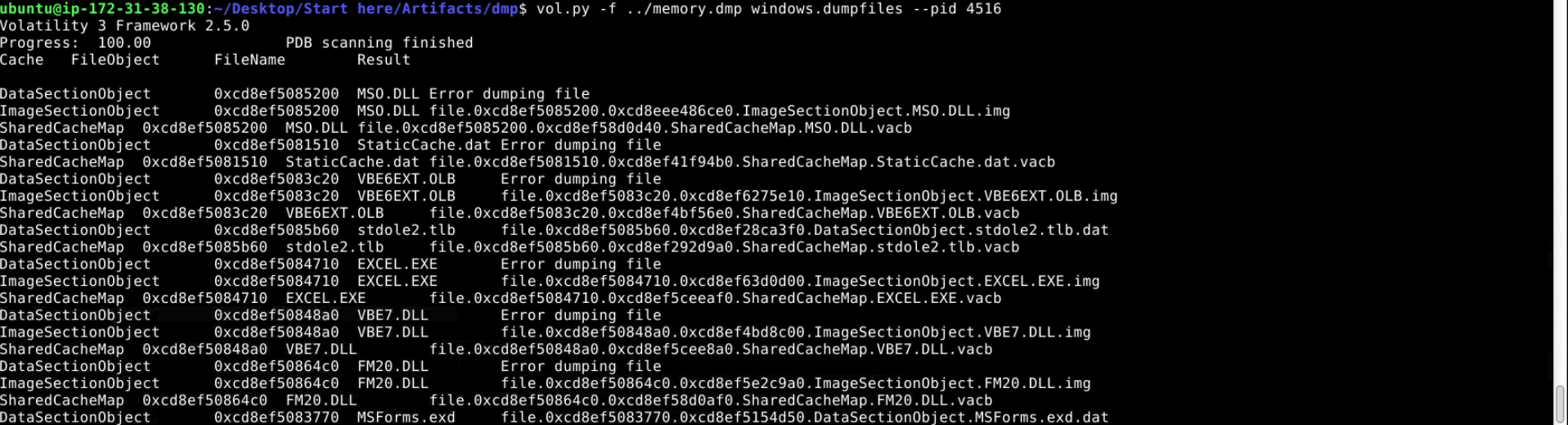
The command gives us way too many files to analyze for us to do by hand, so we can start by filtering the files by common file extensions, like xls, xlsm etc; and doing that, we find our file!
ubuntu@ip-172-31-38-130:~/Desktop/Start here/Artifacts/dmp$ ls | grep xl
file.0xcd8ef507ac60.0xcd8ef514f5d0.DataSectionObject.Payment.xls.dat
The file we're looking for is
Payment.xls -
Hashes are like digital fingerprints for files. Once the hash is known, it can be used to scan other systems within the network to identify if the same malicious file exists elsewhere. What is the SHA256 hash of the malware?
Now that we have the file, this is trivial to answer, we just need to use
sha256sumon it.ubuntu@ip-172-31-38-130:~/Desktop/Start here/Artifacts/dmp$ sha256sum file.0xcd8ef507ac60.0xcd8ef514f5d0.DataSectionObject.Payment.xls.dat 3cef2e4a0138eeebb94be0bffefcb55074157e6f7d774c1bbf8ab9d43fdbf6a4 file.0xcd8ef507ac60.0xcd8ef514f5d0.DataSectionObject.Payment.xls.dat -
To trace the origin of the malware and understand its development timeline, can you provide the UTC creation time of the malware file?
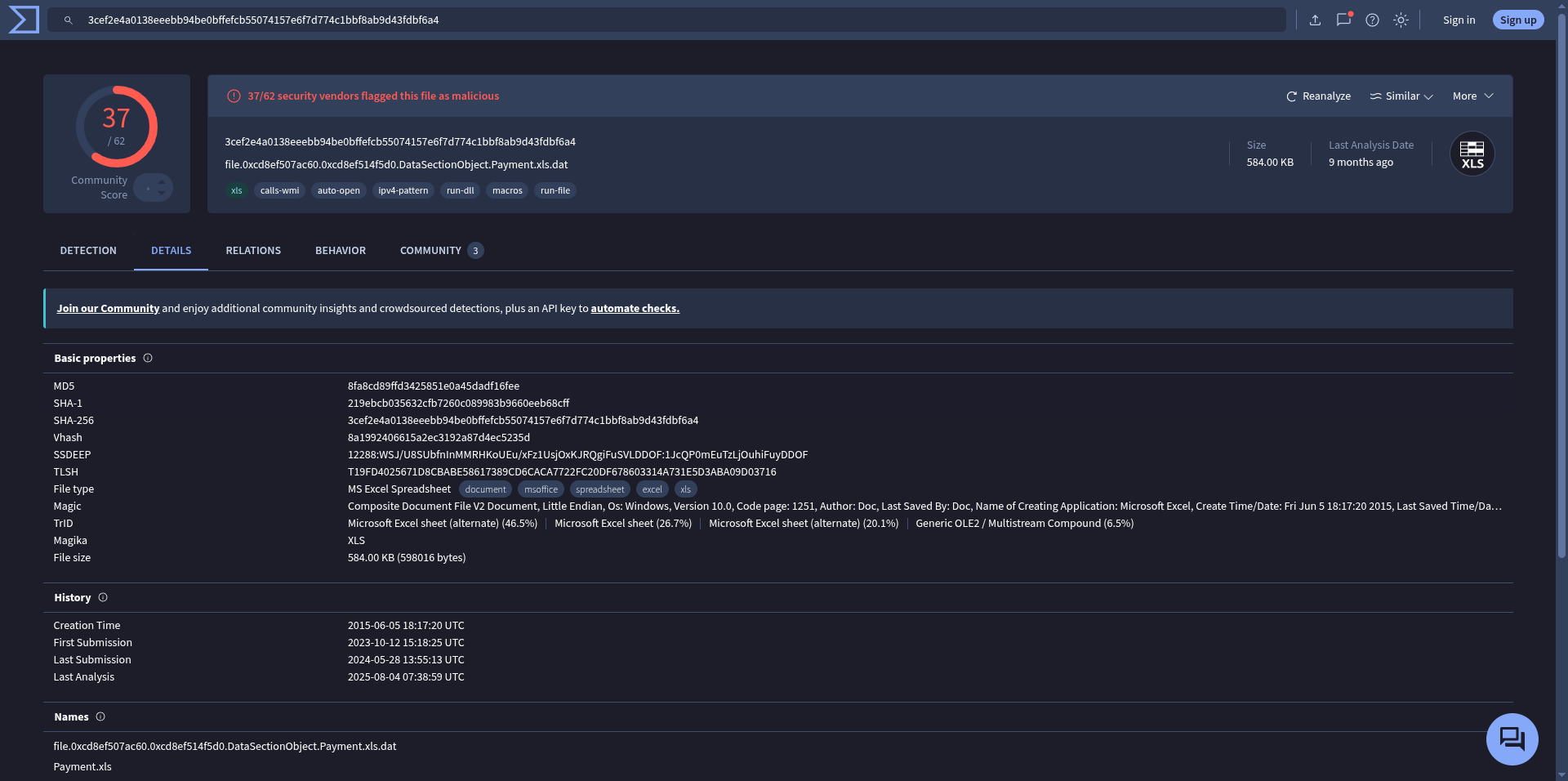
Be not confused, this isn't asking for when the file was created on disk, but when the file was "really" created. To do this, we simply need to plug in the hash we got from the last question into VirusTotal. The creation time is
2015-06-05 18:17:20 UTC